
Download Firefox Showcase – Tab Management, Thumbnail Viewer, Free Extension
Overview
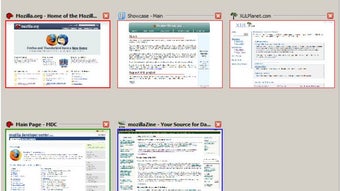
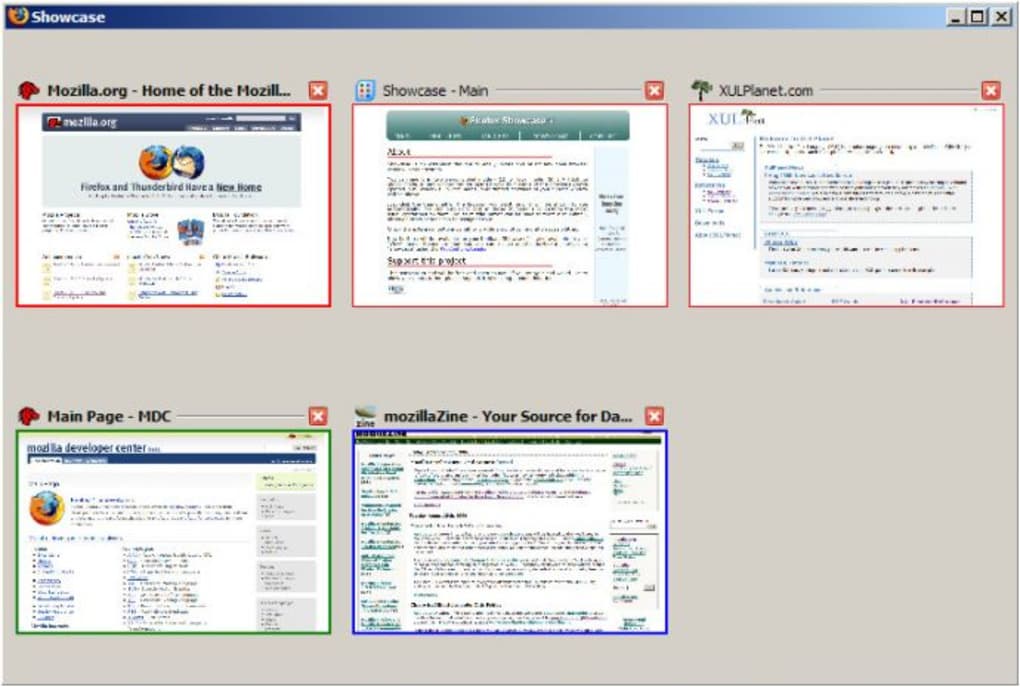
Firefox Showcase reimagines the way you interact with tabs and windows in the Firefox browser. Instead of scrolling through a crowded tab bar where titles become unreadable, Showcase displays every open page as a live thumbnail in a dedicated window, tab, or sidebar. This visual approach makes it instantaneously clear which pages are active, which belong to a particular project, and which can be safely closed.
A built‑in search bar further refines the experience by filtering thumbnails based on keywords you type, allowing you to locate a specific article or document in seconds. Whether you’re a researcher juggling dozens of sources, a developer testing multiple environments, or a casual user who simply loves a tidy browsing session, Firefox Showcase provides a radical alternative to the traditional tab strip. While the extension does consume additional RAM because each thumbnail is a live render of the page, it offers a “local” mode that limits the view to the current window only, reducing memory pressure.
The balance between visual convenience and system resources makes Firefox Showcase a compelling tool for power users who value clarity over sheer tab count. This review explores its core features, installation steps, system compatibility, and the pros and cons that you should weigh before adding it to your Firefox setup.
Key Features of Firefox Showcase
- Live Thumbnail Grid: Every open tab appears as a live, scalable thumbnail, giving you a visual snapshot of each page without switching contexts.
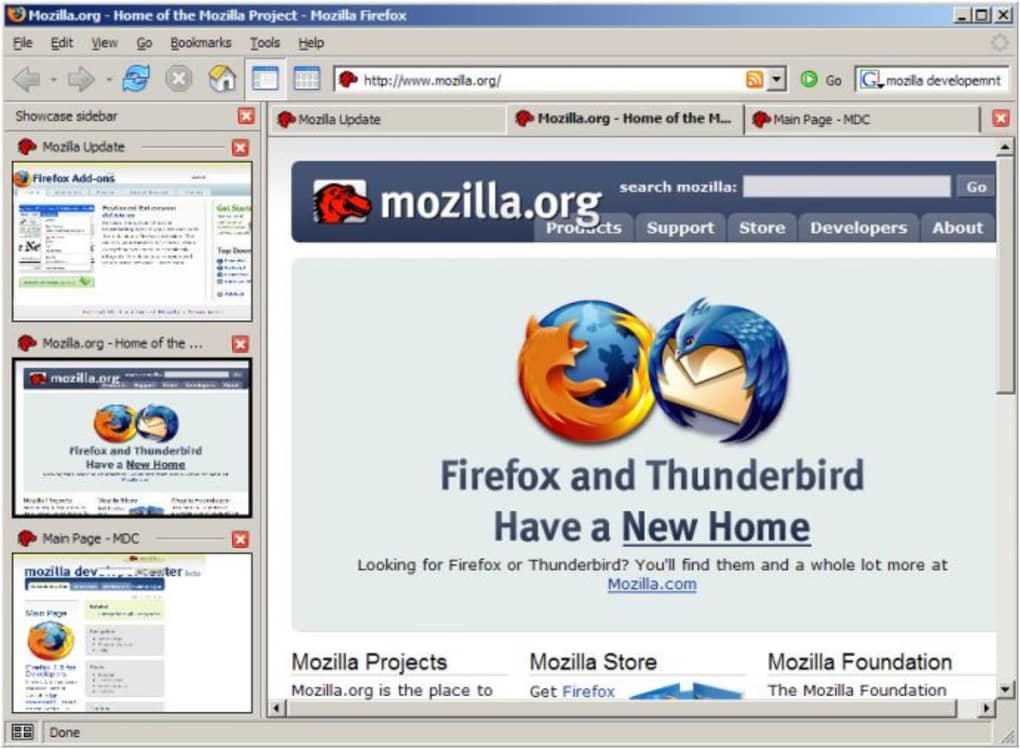
- Sidebar Mode: Collapse the grid into a narrow sidebar that stays visible while you browse, perfect for monitoring multiple windows at once.
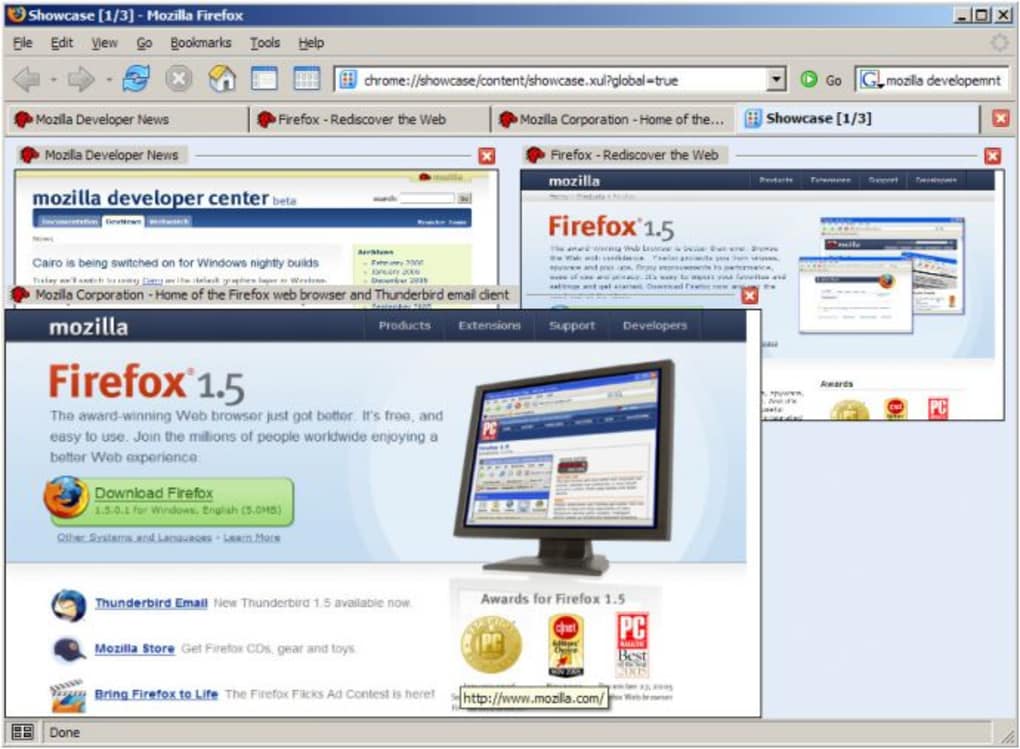
- Global vs. Local View: Choose “global” to see thumbnails from all Firefox windows or “local” to limit the display to the active window, helping manage RAM usage.
- Instant Search Filter: Type any keyword in the built‑in search bar; thumbnails update in real time, highlighting pages that match your query.
- Drag‑and‑Drop Rearrangement: Reorder tabs by dragging thumbnails, enabling quick organization without leaving the Showcase window.
- Bookmark Integration: Bookmark directly from the thumbnail view, preserving the visual context of the page you’re saving.
- Zoom Controls for Linux: Adjust thumbnail size on Linux platforms where scroll‑induced zoom can be problematic.
- Configurable Panels: Updated configuration panel compatible with Firefox 4 and later, offering easy access to settings.
These features combine to make Firefox Showcase not just a tab manager, but a visual workspace that mirrors the way many users think about projects—by grouping related items together and providing a quick visual reference. The ability to see every page as a miniature version of itself eliminates the guesswork that often accompanies long tab rows where titles are truncated. Moreover, the drag‑and‑drop capability turns the thumbnail grid into a lightweight kanban board, allowing you to prioritize, postpone, or discard tabs with a single motion. While the extension shines in its visual strengths, it also respects the need for performance control through its local mode, making it adaptable for both high‑end desktops and more modest laptops.
Installation, Usage, and Compatibility
Installing Firefox Showcase is straightforward. First, open the Mozilla Add‑ons site from within Firefox and search for “Firefox Showcase.” Click the Add to Firefox button, confirm any permission prompts, and the extension will download and install automatically. After a brief restart of the browser, a new Showcase icon appears on the toolbar. Clicking this icon opens the thumbnail window in either a separate tab, a new window, or a sidebar—your choice can be set in the extension’s options panel.
Step‑by‑Step Setup
- Navigate to addons.mozilla.org and locate “Firefox Showcase.”
- Press Add to Firefox and accept the requested permissions (access to tabs and browsing history).
- Restart Firefox when prompted to activate the extension.
- Click the Showcase icon (a grid of squares) on the toolbar.
- Choose your preferred view mode: Window, Tab, or Sidebar.
- Open the Options panel (right‑click the icon → Options) to switch between Global and Local thumbnail modes, adjust thumbnail size, and enable the search bar.
Using the Thumbnail Interface
Once open, the interface instantly populates with thumbnails of all currently open tabs. Hovering over a thumbnail reveals the page title and URL, and a single click brings that tab to the foreground. To close a tab, click the small “X” that appears in the top‑right corner of the thumbnail. The search bar at the top accepts any text; as you type, thumbnails that do not contain the keyword fade, leaving only relevant pages visible. Dragging a thumbnail to a new position rearranges the tab order, and you can also drag a thumbnail out of the Showcase window to create a new Firefox window.
System Compatibility
Firefox Showcase runs on any operating system that supports the latest Firefox releases, including Windows 10/11, macOS 10.15+ (Catalina and later), Linux distributions with Firefox, and Firefox for Android (via a limited mobile interface). While the full thumbnail grid is optimized for desktop environments, the sidebar mode works on tablets running Firefox for Android, albeit with reduced thumbnail resolution to conserve memory.
Performance considerations are important: each live thumbnail consumes additional RAM, especially in Global mode where all windows are rendered. Users with limited memory are advised to enable Local mode, which restricts rendering to the active window only, dramatically reducing the memory footprint. On Windows 10/11 machines with 8 GB RAM or more, Global mode remains stable for typical browsing sessions of 20‑30 tabs. On older hardware, you may notice occasional slowdowns, but the extension remains usable thanks to its ability to throttle thumbnail refresh rates in the options panel.
Pros, Cons, and Frequently Asked Questions
Pros
- Instant visual overview of all open pages.
- Powerful keyword search that filters thumbnails in real time.
- Sidebar mode keeps tab management visible without cluttering the main window.
- Drag‑and‑drop rearrangement turns the tab bar into a visual workflow board.
- Local mode offers a memory‑friendly alternative for low‑spec machines.
- Seamless integration with Firefox’s bookmarking system.
Cons
- Higher RAM usage in Global mode can cause instability on older systems.
- Live thumbnails may briefly lag when loading heavy media‑rich pages.
- Limited customization of thumbnail appearance (e.g., no custom themes).
- Mobile implementation is less feature‑rich compared to the desktop version.
- Requires occasional manual refresh if thumbnails fail to update after a page reload.
Frequently Asked Questions
Can I use Firefox Showcase with multiple Firefox profiles?
Yes. Each profile maintains its own instance of Showcase, and the Global mode only aggregates windows opened within the same profile. This prevents cross‑profile memory spikes.
Is the extension free or does it require a purchase?
Firefox Showcase is completely free to download and use. There are no hidden fees or premium tiers, though donations to the developer are welcomed.
How does the search filter handle case sensitivity?
The search bar performs a case‑insensitive match against both the page title and URL, making it easy to locate tabs regardless of capitalization.
Can I disable thumbnail updates for specific tabs?
Currently, Showcase updates all open tabs automatically. However, you can pause the entire thumbnail refresh in the options panel, which is useful when working with resource‑intensive pages.
Is Firefox Showcase compatible with the latest Firefox Quantum updates?
Yes. The extension has been updated to work with Firefox Quantum (version 57+) and continues to receive patches for new releases.
Conclusion & Call to Action
Firefox Showcase delivers a fresh, visual way to manage the ever‑growing number of tabs that modern browsing demands. Its live thumbnail grid, powerful search filter, and flexible sidebar mode give power users an unprecedented level of control without sacrificing the simplicity of the traditional tab bar. While the memory overhead in Global mode can be a concern, the built‑in Local mode and throttling options provide a practical solution for most setups. If you often find yourself lost in a sea of tab titles, or if you simply appreciate a more organized visual workspace, downloading Firefox Showcase is a worthwhile investment of your time. Click the “Add to Firefox” button today, enable the extension, and experience a cleaner, more efficient browsing workflow.







